For Claude Code, Codex, and any agent with a shell

Know what your agents left running

agenterm runs dev servers, watchers, and test loops in real terminals that keep going after the agent moves on. Each one gets an id, so it never starts twice, and you can watch, type into, or stop any of them.

Download for Mac

Free and open source. That's the Apple Silicon build; there is one for Intel Macs too, and npm covers Linux.

Claude Code ~/code/shop
    agenterm0 running
      The agent starts a web server, an API, and a test watcher. Forty minutes later it runs the web server again and agenterm returns the one already running instead of starting a second copy. When the tests fail, the agent reads their output and restarts them.

      What agenterm fixes

      The Mac app

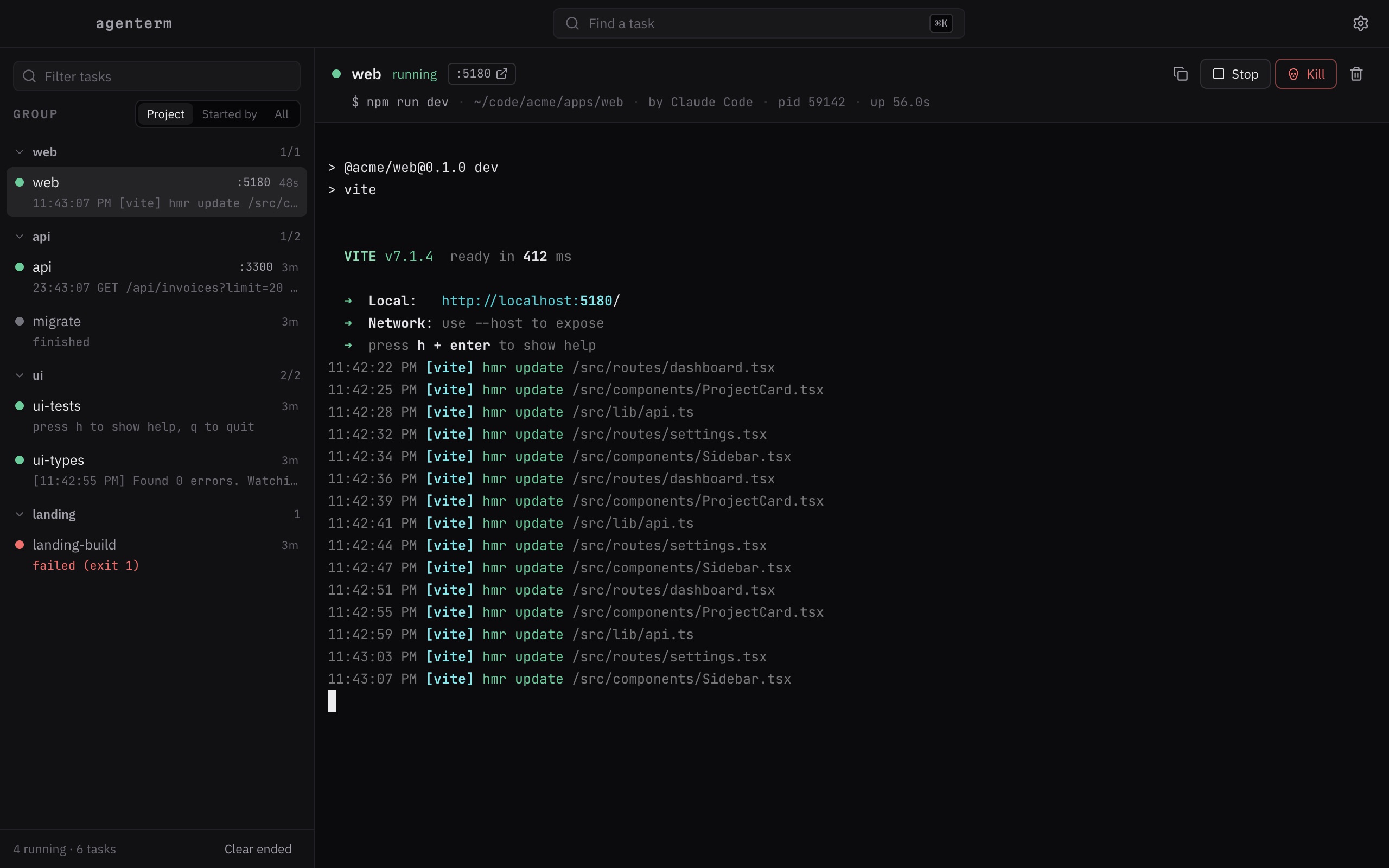
      Every task, one click from its terminal.

      Group tasks by project or by who started them. Click one and type straight into it. Ports open in your browser. A notification tells you when something fails in the background.

      The agenterm app: tasks grouped by project on the left, a Vite dev server's live terminal on the right

      Connect your agent

      One line, then your agent knows.

      agenterm is an MCP server too. The tools match the CLI: run, list, logs, input, stop, remove. Agents can also just call the CLI, and the agent skill teaches them when to.

      claude mcp add --scope user agenterm -- agenterm mcp

      Apps opened from the Dock may not see your shell's PATH. If yours cannot find the command, use the full path that which agenterm prints.

      The CLI

      Small on purpose.

      Name a task by its id, its title, or a unique id prefix. run and ls take --json for scripts.

      agenterm run --id web "npm run dev"
      Start it, or get the one already running
      agenterm ls
      What is running, with ports and who started it
      agenterm logs web -f
      Recent output, then follow it
      agenterm stop web
      Ctrl+C, then end the process tree
      agenterm input web "y"
      Answer a prompt
      agenterm run --id web --restart …
      Replace a running task
      agenterm rm web
      Remove a task and its output
      agenterm mcp
      The same tools over MCP

      Install

      Two ways in.

      Mac app includes the CLI

      The app, the agenterm command, and the MCP server in one download. Nothing else to install. On first launch it offers to add the command to your PATH.

      macOS 12 or later. The app is not signed with an Apple Developer ID yet, so macOS asks you to confirm the first launch: open it once, then System Settings → Privacy & Security → Open Anyway.

      npm Linux, or the CLI alone

      Needs Node.js 22 or newer. The background daemon starts on first use.

      npm install -g agenterm --allow-scripts=node-pty

      On Linux, node-pty builds from source: sudo apt install build-essential python3 first.